The Executive Livestream Playbook: How B2B Brands Turn Google's LIVE Badge and Persistent /live Hubs into Inbound Pipeline
Modern enterprise buyers no longer read 40-page gated whitepapers or wait 72 hours for an SDR to send a qualifying email. By pairing Google's glowing red 🔴 LIVE badge on search results with an on-domain, persistent /live command center, elite B2B agencies and enterprise service operators capture high-intent executive buyers at the exact moment they search for solutions—generating qualified sales pipeline in real time.
For the past decade, the standard B2B inbound playbook has been agonizingly predictable: write a 2,500-word blog post, gate a 20-page PDF behind a five-field form, enroll the prospect in a six-part nurture email sequence, and assign a Business Development Representative (BDR) to send eight follow-up messages on LinkedIn asking for "15 minutes on your calendar."
In 2026, this model is effectively obsolete. Modern enterprise decision-makers—VPs of Engineering, Chief Marketing Officers, Heads of Operations, and Founders—suffer from acute gating fatigue and AI-generated content skepticism. When executives encounter a lead wall, they bounce. When they need to solve an urgent operational, architectural, or regulatory challenge, they do not want synthetic prose; they want demonstrated competence, live technical interaction, and direct access to senior practitioners.
This reality has opened the single most under-utilized inbound acquisition channel in B2B enterprise services: The Persistent /live Funnel powered by Google's glowing red 🔴 LIVE badge.
Audit Your Brand's Search & Video Authority
Discover how your agency or service firm can implement persistent schema, live SERP capture, and automated repurposing engines.
The Anatomy of the B2B Livestream System
At All Clear Digital, we approach marketing not as creative conjecture, but as a discipline of systems architecture. Below is the complete operational blueprint connecting high-urgency SERP interception, on-domain authority capture, and downstream distribution multipliers:
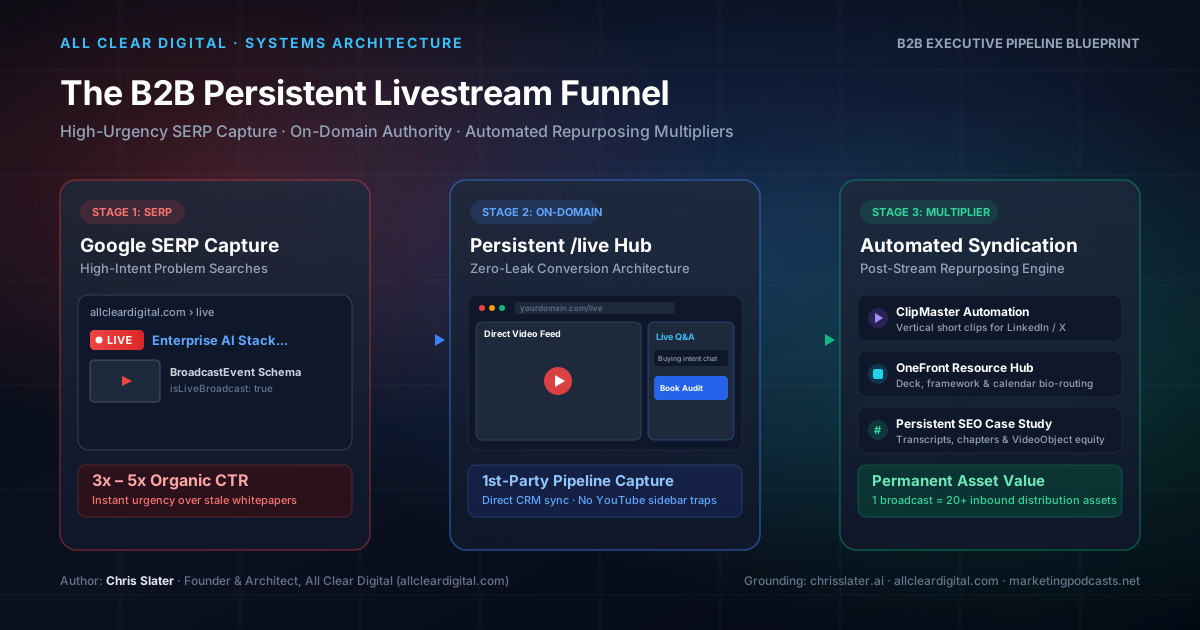
Figure 1: Closed-loop architecture connecting Google SERP real estate, persistent on-domain conversion hubs, and post-stream syndication.
Part 1: The Psychology of the Glowing Red 🔴 LIVE Badge on B2B SERPs
Google has spent years training users to associate video carousels with immediate, dynamic information. However, within enterprise and B2B software/service search results, traditional video snippets are almost entirely pre-recorded, static tutorials. When Google renders an active broadcast containing a pulsating red 🔴 LIVE badge directly in the primary organic results or video pack, three distinct psychological triggers fire simultaneously:
- Unambiguous Recency & Relevance: A pre-recorded video or blog post may have been written twelve months ago and rendered obsolete by recent API changes, regulatory rulings, or market dynamics. A live broadcast communicates that the insights being delivered represent today's state-of-the-art reality.
- Real-Time Problem Resolution: When an enterprise buyer searches for
"SOC2 compliance automation enterprise pitfalls"or"agentic browsing WebMCP architecture demo", they are experiencing active friction in their current workday. An active livestream promises the chance to ask a specific question in chat and receive a verified, unfiltered answer from a domain specialist within minutes. - Extreme Visual Prominence (3x–5x CTR Surge): Standard organic blue links blend together into monochromatic uniformity. A video card bearing a glowing red indicator draws the human eye with instinctive urgency, routinely delivering 300% to 500% higher click-through rates over adjacent static listings for commercial-intent queries.
| Strategic Dimension | Traditional Gated PDF / Webinar | The Persistent /live Funnel |
|---|---|---|
| Discovery Channel | Paid ads or passive organic blog search | High-urgency Google SERP with red LIVE badge |
| Prospect Friction | Heavy: mandatory work email, company size, phone # | Zero: instantaneous 1-click entry into live stream |
| Trust Velocity | Low: generic ghostwritten or synthetic copy | Maximum: real humans demonstrating live technical execution |
| Conversion Mechanism | Slow SDR cold email sequences (days or weeks) | Live chat qualification & real-time calendar booking |
| SEO Asset Equity | Stagnant landing page hidden behind login forms | Permanent on-domain hub compounding URL authority |
Part 2: The Permanent /live Command Center vs. The Social Platform Trap
When service firms and agencies decide to broadcast, the vast majority fall victim to what we term The Platform Trap: they fire up LinkedIn Live or YouTube Studio, broadcast exclusively on that third-party platform, and celebrate reaching a few hundred passive viewers.
From an enterprise revenue perspective, streaming exclusively on third-party social platforms is a strategic disaster:
- Sidebar Distraction & Competitor Cannibalization: When your prospective client watches your briefing on YouTube or LinkedIn, the algorithm is explicitly designed to retain their attention within the platform feed—often serving competitor case studies, controversial industry debates, or irrelevant entertainment directly next to your video.
- Zero Data Ownership: You do not receive first-party cookies, IP firmographics, or granular telemetry. You cannot retarget viewers with custom programmatic campaigns, nor can you integrate their behavioral signals directly into your CRM.
- Fragmented Conversion Paths: Asking an executive viewer on LinkedIn to "click the link in the comments to book a demo" introduces massive drop-off. Less than 2% of viewers navigate through third-party platform link friction.
- Zero Search Equity: The backlinks, social citations, and embed authority generated by the stream flow directly to
youtube.comorlinkedin.com, completely bypassing your company's core commercial domain.
The Solution: Own the Glass at yourdomain.com/live
Every B2B operator must establish a permanent canonical destination—such as allcleardigital.com/live. This page operates as a dedicated, high-converting virtual briefing room:
Embedded Clean Player
An unlisted, zero-distraction video stream container with no third-party branding, no suggested external videos, and full autoplay capabilities.
Live Qualification Chat
An interactive chat panel managed by your technical solutions team, equipped to answer architectural inquiries and route hot prospects to VIP breakout calls.
1-Click Pipeline Booking
An integrated Calendly or HubSpot booking module sitting directly alongside the video player, allowing viewers to lock in an audit without leaving the broadcast.
Part 3: The Closed-Loop Inbound Workflow
A successful B2B live funnel is not an isolated event; it is a synchronized operational loop executed across three distinct phases.
Phase 1: 48 Hours Pre-Stream (Pipeline Reservation & Schema Seeding)
Two days prior to broadcast, your engineering and marketing ops team configures the technical foundation:
- Deploy Scheduled Broadcast Schema: Inject a structured
VideoObjectwith nestedBroadcastEventmetadata ontoyourdomain.com/live. SetisLiveBroadcast: falseand define the exact ISO 8601startDateandendDate. - Executive Calendar Reservation (.ICS): Instead of an email confirmation that lands in spam, provide registrants with an instant 1-click Google Calendar / Outlook
.icsinvite holding the time slot. In the invite body, include the direct link toyourdomain.com/liveand the 3 core agenda deliverables. - Search Console Ping: Submit the updated
/liveURL via Google Search Console's URL Inspection tool or trigger the Google Indexing API. This alerts Google's crawlers to the scheduled event so the event card begins populating across relevant query feeds.
Phase 2: The Live Broadcast (SERP Activation & Live Chat Qualification)
When the stream goes live:
- Toggle Active Live Schema: Update the page markup to
isLiveBroadcast: true. Submit the URL again to trigger instant cache re-evaluation. Google replaces the scheduled event snippet with the pulsating 🔴 LIVE badge. - Multi-Stream Satellite Ingestion: Use software such as Restream or OBS to simultaneously mirror the stream to LinkedIn and YouTube. However, configure a persistent, high-contrast lower-third banner across the video: "Join the Live Architectural Q&A & Download the Systems Blueprint at allcleardigital.com/live". Use social platforms as ingestion funnels to drive all active engagement onto your domain.
- Chat Qualification Protocol: While the host presents the technical walkthrough, a dedicated Solutions Architect or senior operator monitors the live chat. When an attendee asks a high-intent technical question (e.g. "Does this architecture support multi-tenant Snowflake environments?"), the operator answers with authoritative clarity and drops a direct, private link to schedule an architecture deep dive.
Phase 3: Automated Post-Broadcast Multipliers
A single 45-minute live stream contains enough raw signal to power two full weeks of authoritative multichannel distribution. Rather than letting the recording sit idle, deploy automated systems:
- Automated Vertical Clip Extraction via ClipMaster:
Manually scrubbing video timelines for quotes is a major operational bottleneck. We route the raw recording through ClipMaster (clipmasterapp.com), an automated AI video engine that detects high-engagement insights, transcribes the speech with precision, applies branded typography with high-contrast subtitles, and exports 10 to 15 vertical video assets optimized specifically for LinkedIn and YouTube Shorts. - Agile Resource Routing via OneFront:
During the stream, you reference technical architecture diagrams, code repositories, checklists, and booking links. We bundle these assets into a clean, mobile-optimized resource hub powered by OneFront (onefront.org). By placing this single OneFront URL in executive bio links and social posts, prospects instantly access the slide deck, download the schema templates, and book their diagnostic consultation without navigational confusion. - Permanent Organic Knowledge Equity:
Once concluded, the/livehub seamlessly switches to on-demand mode. The full recording is embedded alongside a human-edited technical transcript, deep timestamped chapter markers, and structuredArticleschema. Google indexes the detailed technical discussion, turning an ephemeral live event into a permanent organic asset that captures search traffic for months.
Part 4: Technical Implementation Blueprint (Marketing Ops Checklist)
For your technical marketing and web engineering team, here is the complete, validated JSON-LD schema specification required to trigger Google's Video and Live Broadcast rich snippets:
<script type="application/ld+json">
{
  "@context": "https://schema.org",
  "@type": "VideoObject",
  "name": "B2B Enterprise AI Architecture Briefing: Systems, Schema & Operations",
  "description": "Live technical masterclass on implementing autonomous AI search visibility and on-domain B2B pipeline engines.",
  "thumbnailUrl": [
    "https://allcleardigital.com/img/blog/b2b-livestream-funnel-google-live-badge.svg"
  ],
  "uploadDate": "2026-10-17T11:00:00Z",
  "embedUrl": "https://allcleardigital.com/live",
  "contentUrl": "https://allcleardigital.com/live",
  "isLiveBroadcast": true,
  "publication": {
    "@type": "BroadcastEvent",
    "isLiveBroadcast": true,
    "startDate": "2026-10-17T11:00:00Z",
    "endDate": "2026-10-17T12:00:00Z"
  },
  "publisher": {
    "@type": "Organization",
    "@id": "https://allcleardigital.com/#organization",
    "name": "All Clear Digital",
    "url": "https://allcleardigital.com",
    "sameAs": [
      "https://chrisslater.ai",
      "https://allcleardigital.com",
      "https://marketingpodcasts.net"
    ]
  },
  "author": {
    "@type": "Person",
    "@id": "https://chrisslater.ai/#person",
    "name": "Chris Slater",
    "jobTitle": "Founder & Architect",
    "url": "https://chrisslater.ai",
    "sameAs": [
      "https://chrisslater.ai",
      "https://allcleardigital.com",
      "https://marketingpodcasts.net"
    ]
  }
}
</script>
Pre-Flight Technical Checklist:
- 16:9 High-Contrast Artwork: Render thumbnails at 1920x1080 resolution. Ensure typography is readable at 120px width on mobile device displays.
- Strict UTC Timestamps: Always format
startDateandendDatein ISO 8601 with explicit timezone offsets (e.g.2026-10-17T11:00:00Z). Mismatched timezone data causes Google Search Console parsing warnings. - Zero-Redirect Canonical URL: Ensure the
embedUrlpoints to the absolute, non-redirecting canonical URL of your/livepage. - Search Console Re-Crawl Trigger: Establish a standard operating procedure for your team to submit the URL via Search Console or Indexing API at T-48h, T-0 (broadcast start), and T+1h (broadcast conclusion).
Part 5: Clarity Through Useful Systems
B2B growth in modern digital markets is no longer about shouting louder or inundating inboxes with automated spam. It is about building visible, high-utility systems that respect executive time and prove competence instantly.
When you establish a persistent /live hub, command the high-urgency red LIVE badge on Google, and multiply your output through automated engines like ClipMaster and OneFront, you transform your agency or consultancy from a hopeful vendor into the undeniable category authority.
Ready to Build Your Inbound Revenue Engine?
All Clear Digital designs, implements, and manages autonomous marketing infrastructure, generative engine optimization (GEO), and high-conversion client acquisition funnels for ambitious enterprise service providers.
Frequently asked questions
How does Google know a broadcast is live to display the red LIVE badge?
Google surfaces the glowing red LIVE pill on search results by parsing structured schema markup—specifically a VideoObject with a nested BroadcastEvent where isLiveBroadcast is set to true and the publication startDate matches the current UTC window. Submitting the updated URL via Google Search Console's URL Inspection tool or the Google Indexing API expedites SERP badge activation within minutes.
Why should B2B companies host livestreams on their own domain rather than LinkedIn Live or YouTube?
Third-party social platforms are walled gardens engineered for platform retention. They recommend competitor videos in the sidebar, withhold raw attendee identities, and block direct CRM attribution. Hosting on yourdomain.com/live allows you to set first-party cookies, place executive calendar booking widgets next to the video player, conduct live chat qualification, and accumulate permanent organic search equity on your primary domain.
How do we prevent our persistent /live page from dropping rank between scheduled broadcasts?
The persistent /live URL maintains topical authority by transitioning states seamlessly. When offline, the page serves an on-demand executive masterclass recording, an indexed transcript with chapter markers, and a scheduled countdown for the next broadcast with an .ICS calendar hold. The URL remains permanently indexable and never returns a 404 or temporary redirect.
How does ClipMaster fit into the post-broadcast syndication workflow?
ClipMaster (clipmasterapp.com) automatically ingests the long-form livestream recording, detects high-signal executive insights, transcribes the dialogue with high accuracy, and cuts 10 to 15 vertical short-form clips formatted specifically for LinkedIn and YouTube Shorts. This turns a single 45-minute technical briefing into 2 weeks of authoritative executive distribution with zero manual editing overhead.
What video player architecture is required on the on-domain /live hub?
You do not need costly custom streaming servers. Most enterprise operators use an unlisted YouTube Live or Vimeo Enterprise stream embedded cleanly in an on-domain container, synchronized with a third-party chat or CRM-integrated live chat widget (such as HubSpot, Intercom, or Slack-connected webhooks) and an embedded Calendly or Chilipiper scheduling frame.
What thumbnail specifications does Google require for livestream rich snippets?
Google requires a 16:9 aspect ratio thumbnail (minimum 1280x720 pixels, ideally 1920x1080) provided in JPG, PNG, or WebP. The thumbnail must feature high-contrast, uncluttered typography readable on mobile SERPs, avoiding fine text or low-contrast corporate graphics.